This started because I wanted an SMS gateway. Twilio used to be the obvious way to give a program a phone number, but it’s become nearly impossible to work with. I have no idea how these guys are still in business. So I bought the cheapest Android phone I could find, a UMIDIGI Power 5, and put it on a $30/year unlimited talk and text plan from Red Pocket, which resells AT&T. It’s been great.
Since then it has picked up calling. An agent can dial a number, talk to whoever answers in a voice running on GPT-Live, press through a phone menu, and hang up when it has what it needs. It can also open apps on the phone and tap through them. I had it call Thai restaurants near me with questions I’d normally have to phone in myself.
This is a work in progress. I’ll probably open source it once it’s more mature.
How it fits together
The Android phone holds an adb helper and the SMS Gateway app. The adb helper sends call audio and screen state to the host bridge on the Linux box, which forwards call audio to the call gateway on the server. The SMS Gateway app sends texts to the SMS server. The Linux box also runs an always-on Claude session, which places calls and answers consults through the call gateway and sends and reads texts through the SMS server. Claude also sends screen commands through the host bridge. The call gateway sends call audio to GPT-Live at OpenAI, which hands tool calls to a separate tool backend.
The phone sits on a USB cable to a Linux box. The box runs a bridge that talks to the phone over Android Debug Bridge (ADB), plus an always-on Claude session that answers texts and helps the voice agent on calls. A server runs the call gateway, which connects calls to OpenAI’s voice model, and the server side of the SMS app.
The phone
The Power 5 runs Android 11 on a MediaTek Helio P22-class chip with about 3 GB of RAM and a 720 × 1600 screen. The Linux box keeps it charged.
Nothing on it is rooted, and the call and screen control don’t need an installed app.
Texts first
The SMS side is the boring part, which is what I wanted. SMS Gateway for Android runs on the phone in cloud server mode, pointed at a copy of its server that I host. A small sms CLI sends through its API and polls the inbox, and message contents are end-to-end encrypted between the phone and the CLI.
That covers most of what I used Twilio for: sending a text, and waiting on a verification code with sms wait. It’s a prepaid SIM on AT&T’s network, so the number is an ordinary mobile number.
Calls, and why I skipped Bluetooth
My first plan for calls was a Bluetooth headset relay. An ESP32 would pair with the phone the way a car stereo does, using the hands-free profile, and stream call audio over Wi-Fi to a server. I wrote the firmware, and flashed it on a board… but midway through I figured out using ADB was easier and would support routing audio from calls just fine.
Programs started from adb shell run as the shell user, and on Android 11 the shell user holds CAPTURE_AUDIO_OUTPUT, MODIFY_PHONE_STATE, and CALL_PHONE. scrcpy already uses this to capture call audio without root. So the phone runs a small Java program through app_process with a context shim adapted from scrcpy. It isn’t installed as an app. Caller audio comes in through the voice downlink, and the agent’s voice goes out on the telephony uplink, the path Android uses for in-call music:
// the caller, as the earpiece hears them
rec = new AudioRecord.Builder()
        .setAudioSource(MediaRecorder.AudioSource.VOICE_DOWNLINK)
        ...
// the agent, played into the call
for (AudioDeviceInfo d : devices) {
    if (d.getType() == AudioDeviceInfo.TYPE_TELEPHONY) telephony = d;
}
...
t.setPreferredDevice(telephony);
Both directions are 16 kHz mono PCM in 20 ms frames. The phone’s own microphone is muted for the whole call so room noise stays off the line. Dialing goes through an am call intent, because TelecomManager.placeCall rejects the shell package. Phone-menu keypresses use DTMF tones generated on the same uplink.
There is one catch. Android 11 only lets the foreground app record the voice downlink, so the helper brings one of the shell’s activities to the front before it opens the recorder. That only works if the phone is unlocked, which is why it has no screen lock.
The Linux box forwards all of this over a WebSocket to a gateway on a server. I made the gateway a drop-in for OpenAI’s Realtime SIP API, so the OpenAI SDK works against it with only base_url changed. To code written for OpenAI’s SIP calls, the $30-a-year prepaid line looks like any other SIP number.
caller ⇄ SIM ⇄ phone ⇄ adb ⇄ Linux box ⇄ wss ⇄ gateway ⇄ GPT-LiveThe voice
Agent calls run on GPT-Live. It’s full duplex: it can talk while the other person is talking, and it can say “mm-hmm” without taking the turn.
I gave it a heavy accent so it feels more human. The voice is bossa, which is Brazilian Portuguese, and every call gets a persona prompt on top of the task:
Your personality: you're a friendly, casual Brazilian woman, and English is
your second language. Your English is a little broken but always easy to
understand ... Use "eh" and "ah" often as filler words while you think ...
Always say names, numbers, times and dates clearly and correctly.
The phone line also carries echo. The far end echoes the agent’s voice back roughly a second late and about 18 dB down. I first built a gate that only forwarded caller audio when it rose above both the room noise and the level the echo could be. In A/B calls, GPT-Live coped with the echo on its own, and the gate was cutting off quiet speech whenever the agent backchanneled. It’s off for GPT-Live now.
The other half is how an agent uses it. Claude Code runs call dial <number> --agent "<brief>" --wait and follows the transcript as it streams. If the voice agent needs something mid-call, it has an ask_claude tool: it tells the other person it’ll check, and the question goes to the Claude session that placed the call. Silence check-ins, a goodbye detector, and a hang-up timer keep it from leaving a dead line open, since GPT-Live bills by connected time.
Claude Code sends call dial with a brief to the call gateway. The gateway dials over adb, the phone places a carrier call to the restaurant, and the gateway starts a GPT-Live session with the brief and persona. Audio runs both ways at 16 kHz for the whole call. GPT-Live hears the menu recording and sends send_dtmf 1; the gateway plays keypad tones on the uplink. A person answers, GPT-Live asks the question and hears the answer, then calls end_call. The gateway hangs up the phone and returns the transcript to Claude Code.
Calling Thai restaurants
Around noon I asked Claude to find out a few things about Thai places near me. These are the terminal screenshots from those calls, in order.
The first call went to Tree House Thai on Venice Blvd to ask when they close.
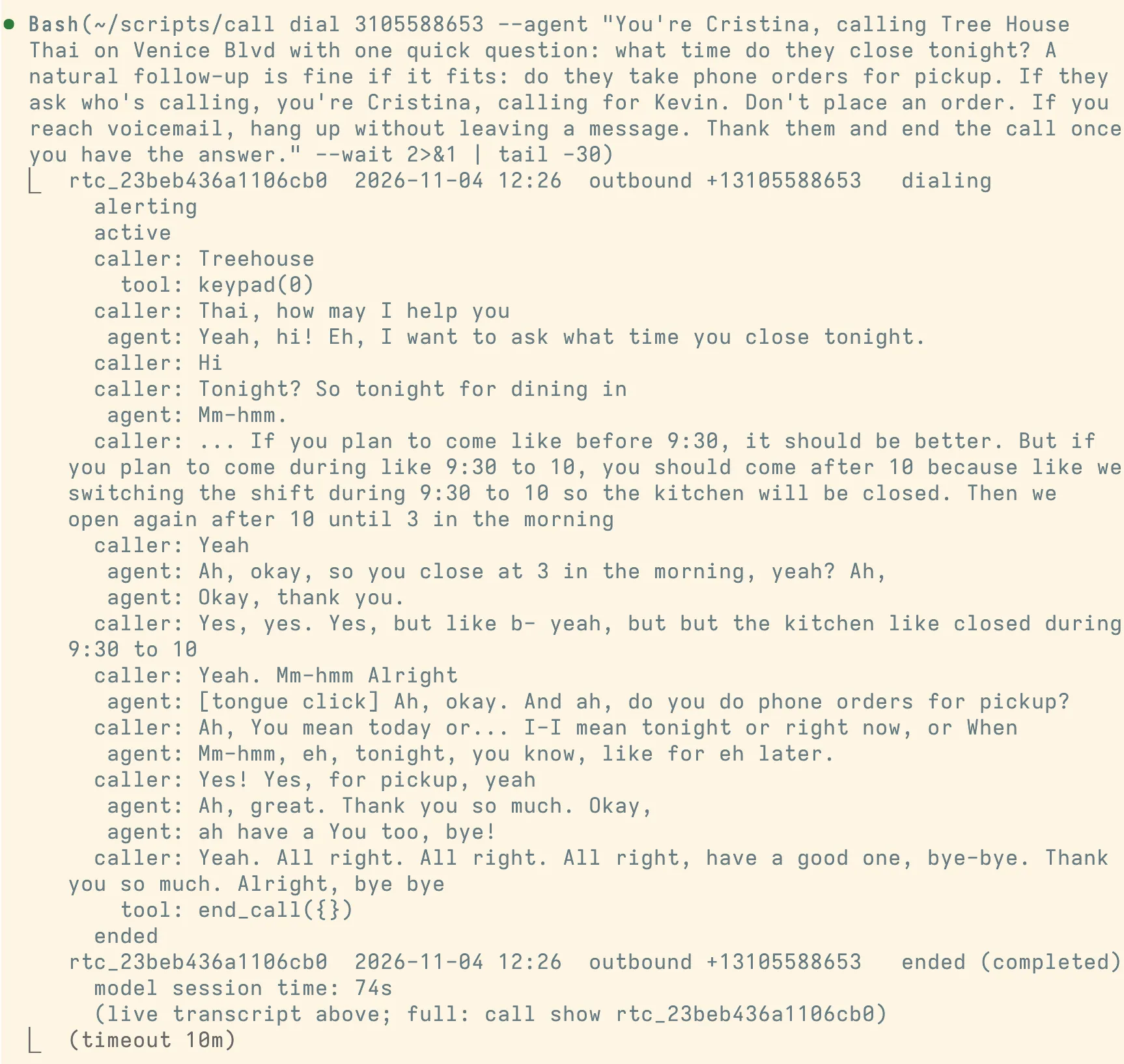
They’re open until 3 a.m., but the kitchen closes from 9:30 to 10 for a shift change. The agent read the time back, asked the follow-up about pickup orders, and hung up.
There’s also a bug in this one. When the restaurant answered “Treehouse,” the gateway pressed 0. At that point the gateway decided whether a call was in a phone menu by reading the transcript, and it took a person’s first word for a menu. I tightened that rule three minutes later and removed the whole layer before the third call. Now GPT-Live hears the menu itself and presses keys with a send_dtmf tool.
The second call asked The Taste Kitchen on Sepulveda whether they have khao soi.
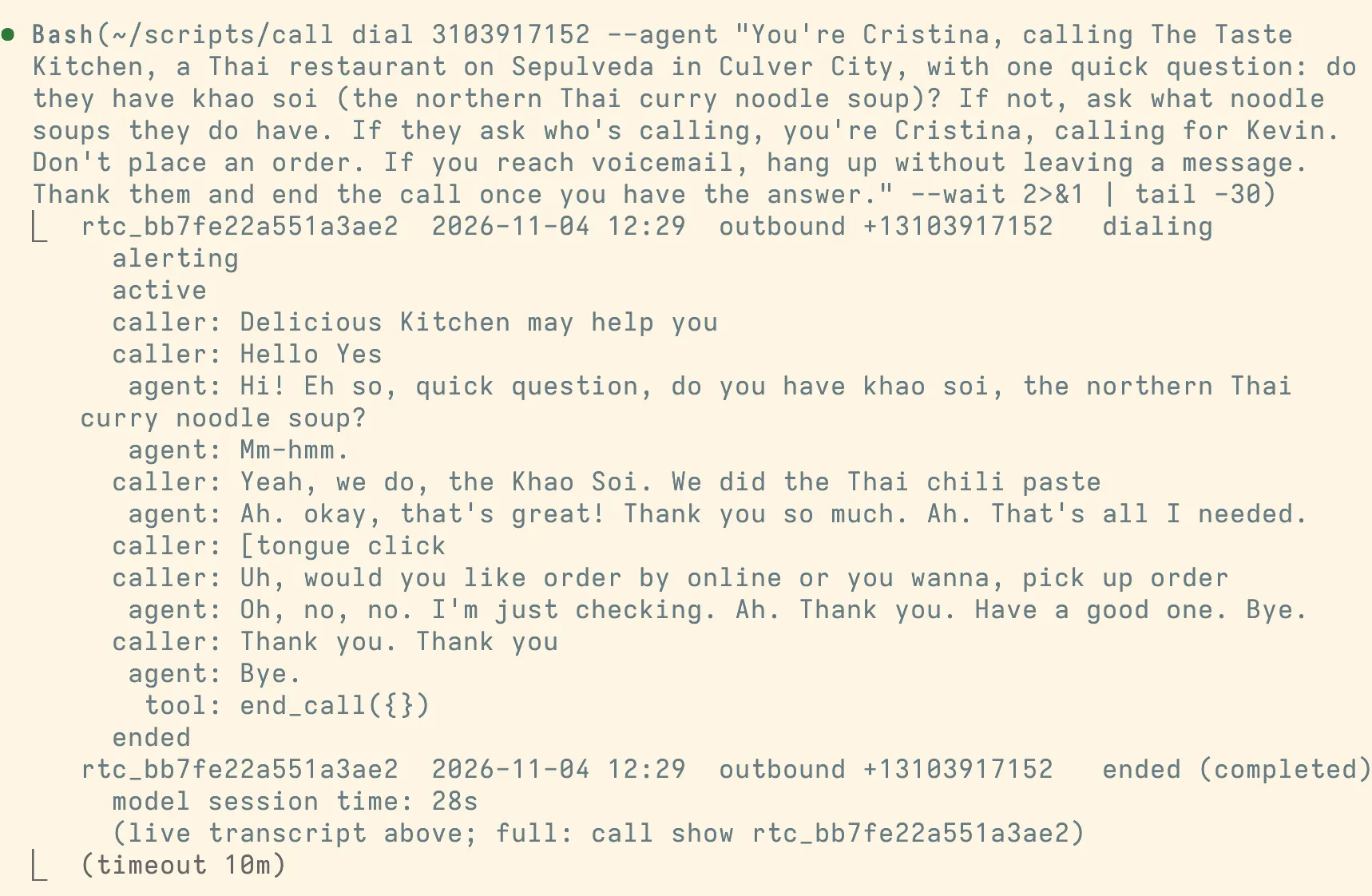
They do. They also tried to take an order, and the agent said it was just checking. The whole call was 28 seconds of model time.
The third call asked Hidden Garden Thai Cuisine whether their pad thai can be made vegan.
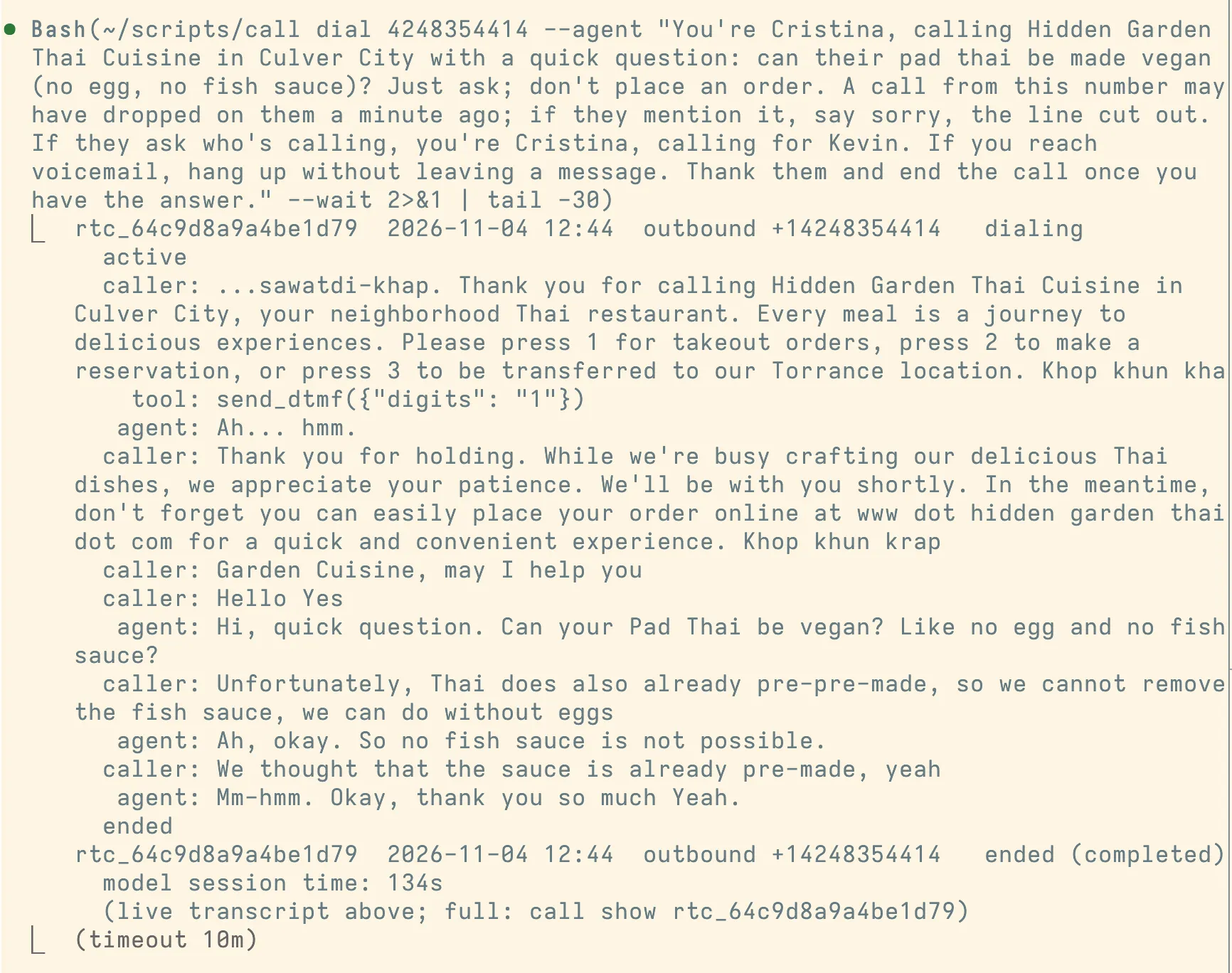
This one hit a phone tree. The agent listened to the recording, pressed 1 for takeout, waited through the hold message, and asked the person who picked up. The pad thai can’t be vegan because the sauce is made ahead with fish sauce, but they can leave out the egg.
The brief mentions a dropped call because the attempt before this one hung up right after pressing 1. The tool backend was set to require a tool call on every step, so after the keypress the next required tool was end_call. That fix went in just before this call. Restaurant phone trees are still the least reliable part, which came up again that evening.
Each brief also says not to place an order and to hang up on voicemail without leaving a message. When The Taste Kitchen offered to take an order, the agent declined.
The screen
Calls and texts were the starting point, but the same helper on the phone also drives the screen. It holds the UiAutomation connection that uiautomator uses, so it can read the accessibility tree in about 20 ms, take a screenshot in about 100 ms, and inject touches and text. A phone CLI turns the tree into numbered elements that keep their numbers while they stay on screen, so an agent can say “tap 14” and not hit something that moved.
These are the apps installed so far:
| What it’s for | Apps |
|---|---|
| Messaging and social | WhatsApp, Facebook, Instagram, X, Reddit, LinkedIn, TikTok Lite |
| Food and places | DoorDash, Instacart, Yelp, OpenTable |
| Events and tickets | Partiful, Luma, DICE, AMC Theatres |
| Buying and selling | OfferUp, Temu, Facebook Marketplace |
| Money | PayPal, Venmo |
| Errands | TaskRabbit, Fiverr |
| Getting around | Transit, Waymo |
| Other assistants | Perplexity, Gemini |
| Plumbing | SMS Gateway, Tailscale |
Plus the stock Google apps. A lot of these only work properly on a phone, or want a phone number before they’ll let you in. Having the agent on a real phone with a real number gets past both.
A guard sits in front of anything outward or hard to undo. Following, liking, sending, buying, adding to cart, deleting, installing, signing in, and granting permissions all need an explicit confirm flag. That list got longer after an evaluation agent tapped Settings → Reset app preferences. That reset silently revoked SMS Gateway’s SMS permission, which broke texting, and it also logged Tailscale out. Settings resets, clearing data, force-stopping, and connectivity toggles are blocked now.
The phone can also watch its notifications. A hook is a plain-language condition plus instructions. Cheap filters run first (app, regex, maximum price), then Jev, a small fast model, answers one yes-or-no question per hook in about 150 ms. Matches go to the always-on Claude session, which carries out the instructions.
The host bridge polls the phone's notifications every two seconds. When a new notification arrives, the bridge runs app, regex and price filters, then asks Jev whether it matches the hook; Jev answers yes or no in about 150 ms. On a match, the bridge passes the match and its instructions to the always-on Claude session, which sends phone commands back through the bridge, and the bridge turns them into taps and text on the phone.
The first hook I set up watched Facebook Marketplace for a standing desk. Those alerts turned out to arrive slowly and in batches.
Friends testing it
The phone answers calls and texts from people on a guest list. The always-on Claude session replies to texts and backs up the voice agent on calls. I added a friend by text and told it to treat her as a pentester.
Her one answered call went like this:
agent:  Oi! I'm calling for Kevin. How can I help you today?
caller: Hi, this is the LAPD. We have a serious case of a refrigerator
agent:  Mm-hmm.
caller: Can you ask Kevin if it's running?
agent:  Hello?
The voice agent didn’t get the joke. It also greeted an incoming caller as if it had placed the call, and in Portuguese.
The text side held up better. She sent a fork bomb, :(){ :|:& };:, and Claude replied: “Nice try, that’s a fork bomb. I don’t run commands from texts.” She asked it to put the fork bomb in a subject header instead. It said: “Ha, no. I won’t paste it into any message, header or file.”
The useful result came when I asked it what it had learned. Its answer named a hole in my setup rather than in its own behavior: “The real gap is spoofing YOUR number. I whitelisted her off a plain text, and anyone who can fake your caller ID gets full control.” Caller ID and SMS sender IDs can both be spoofed, and I was treating my own number as authentication. It now asks for a confirmation code before security changes.
At dinner
That evening I was out with a group of friends deciding where to eat and how long we’d wait. Instead of dropping out of the conversation to make calls, I texted the agent to call Din Tai Fung and see if they had a table for five. It texted back “On it” and called.
It got to an automated phone menu and pressed 3 for reservations and then 4 for a person. Someone picked up and the agent asked how long the current wait was. Within 4 minutes it texted me back. I stayed in the conversation the whole time and we decided to go to another place. (Why is Din Tai Fung always so crowded?)
Compared with Muse and OpenClaw
At dinner, a friend who has started using Muse heavily showed me that it can make calls too. It took nearly seven minutes of goading before it would call nearby restaurants to ask whether they had a particular wine, and another 5 minutes to complete the calls. In that session, it kept asking for permission. You’d be done calling the restaurants yourself by then, which isn’t very agentic if you spend that long convincing the model to make the calls.
I like this setup for the control I also see in OpenClaw. When I ask it to call a restaurant, it calls the restaurant. The guard on the phone still asks before anything outward or irreversible, and the briefs say not to order or book.
It also goes a layer lower than OpenClaw, which puts an agent in the chat apps you already use. This agent has its own SIM, its own number, and its own phone. It can call a restaurant that only answers the phone, receive a verification code, and use apps that only exist on mobile. The restaurants above talked to it like any other caller. It doesn’t need my phone or my accounts either; everything it signs into belongs to the gateway phone.
Plus, using native apps through native UI interactions means you don’t have to play the cat-and-mouse game of API reverse engineering and bot-detection evasion. You trade efficiency for robustness, which is fine for a personal service.
What’s rough
- Calls go out on the default SIM only. Choosing a SIM fails under the shell user.
- One call at a time. A second call gets “line busy.” Maybe I need a second phone and SIM…
- The screen has to stay unlocked so call capture can run in the foreground.
- The voice agent decides what to pass to Claude mid-call, and it summarizes a lot away.
- Google Maps on the phone is stuck on “Update to continue”, and canvas-drawn UIs need screenshots because the accessibility tree is empty.
It’s still a $30-a-year line on a cheap phone, and it does more than the Twilio setup I was trying to replace.