PGP’s UX is dogshit. Getting someone to install it, make a key, send you the right part, and maintain the rest is a lot of work to send a password. Good luck getting a loan officer to maintain a keyring for your bank details.
A developer needs to share an API key. You have a security disclosure, and the recipient hasn’t published a PGP key. Pasting into chat works, but leaves the plaintext available to whatever retains or inspects the transcript.
I built moreutils/secrets to make that handoff easier. It’s part of moreutils, my suite of small browser tools. Neither person needs an account or an installed encryption tool. The wider project is in The joy of a tool that does one thing.
A link out, an encrypted reply back
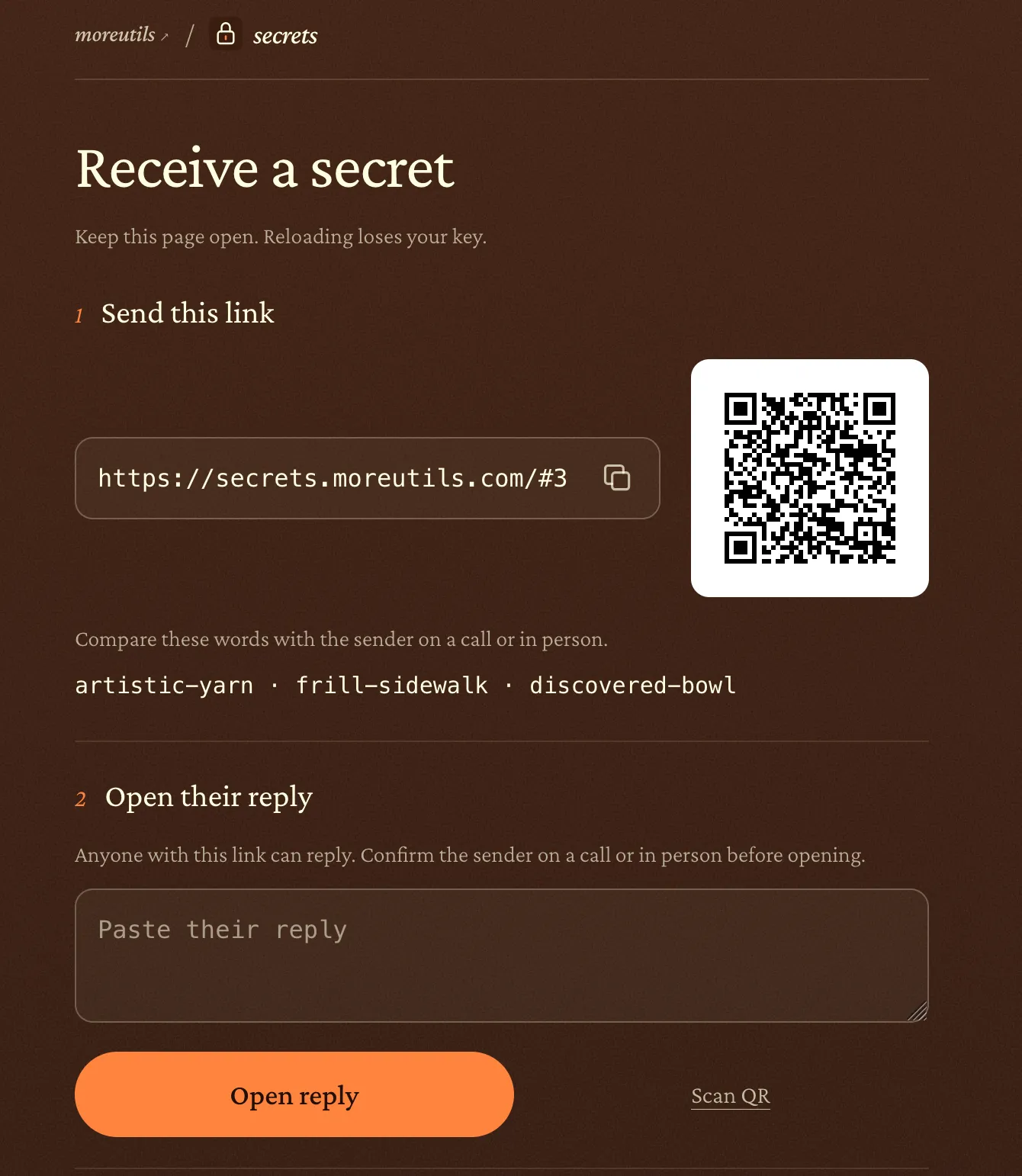
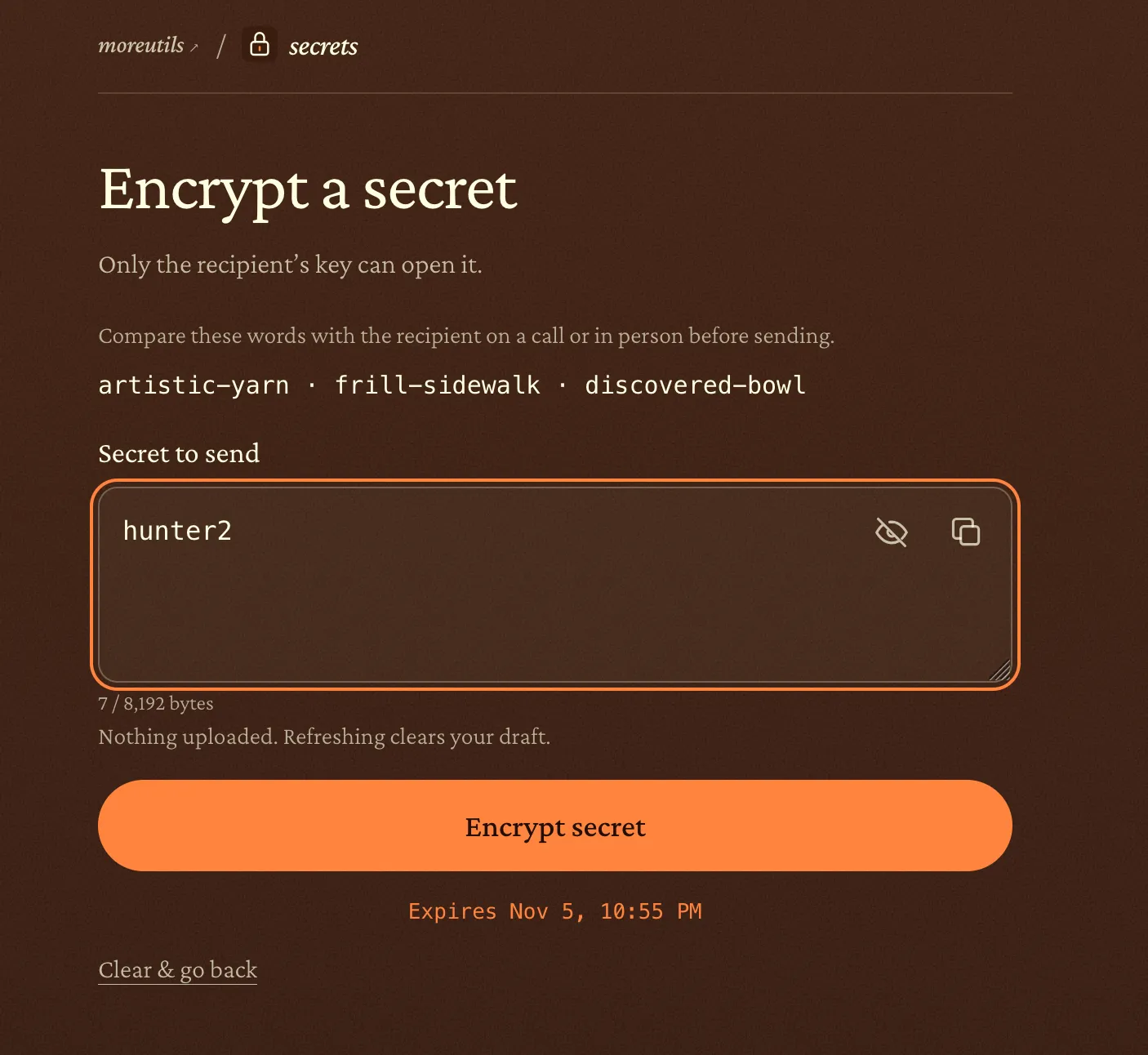
The recipient makes a receiving link. The sender opens it and pastes the secret.
The animation and compact sequence show the handoff. Side annotations explain X25519 encapsulation, HKDF-SHA256, AES-128-GCM, request authentication and reply fields. On mobile the annotation follows the selected stage. The private key stays local; ciphertext authentication does not establish sender identity.
View source values
| Part | Meaning | Size or scope |
|---|---|---|
| request | Version (1 byte), expiry (4 bytes), recipient public key pkR (32 bytes). | 37 bytes |
| pkR / skR | Recipient X25519 key pair. The non-exportable private key skR stays in the key worker. | pkR: 32 bytes; skR: local |
| enc | Fresh sender public key emitted by DHKEM(X25519, HKDF-SHA256) encapsulation. | 32 bytes |
| HKDF context | HPKE derives the AES key and base nonce. info is the protocol domain label followed by the complete request. | HKDF-SHA256 |
| AAD | The complete request is authenticated with the encrypted reply. | 37 bytes |
| ciphertext | Encrypted UTF-8 secret followed by the AES-GCM authentication tag. | Secret bytes + 16-byte tag |
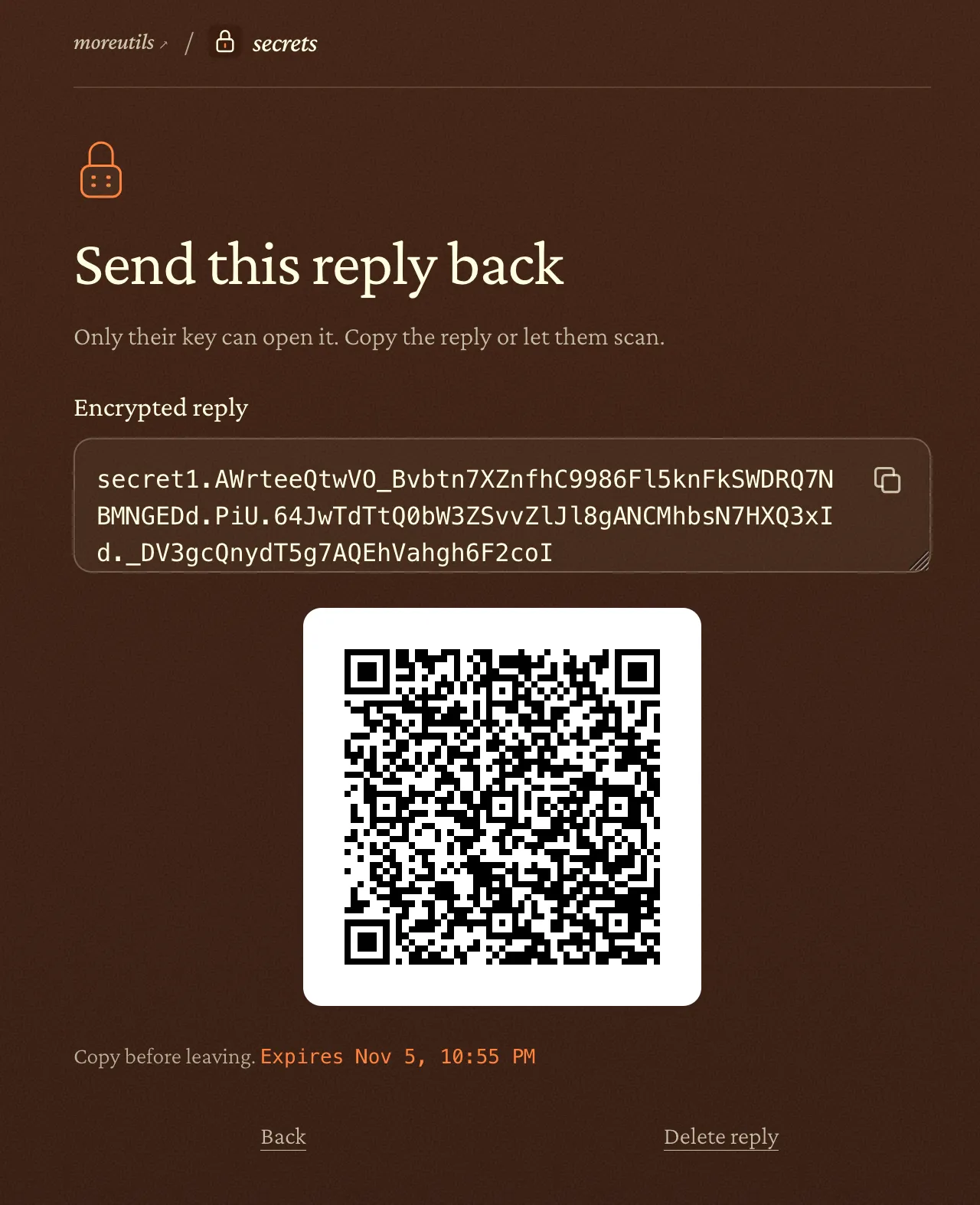
| reply | secret1. prefix, then encoded request, enc and ciphertext. | Variable length |
| open | Match request and expiry; decapsulate with skR and enc; verify GCM tag. Discard skR only after a valid ordinary opening. | Recipient-local |
| Part | Meaning | Size or scope |
|---|---|---|
| request | Version (1 byte), expiry (4 bytes), recipient public key pkR (32 bytes). | 37 bytes |
| pkR / skR | Recipient X25519 key pair. The non-exportable private key skR stays in the key worker. | pkR: 32 bytes; skR: local |
| enc | Fresh sender public key emitted by DHKEM(X25519, HKDF-SHA256) encapsulation. | 32 bytes |
| HKDF context | HPKE derives the AES key and base nonce. info is the protocol domain label followed by the complete request. | HKDF-SHA256 |
| AAD | The complete request is authenticated with the encrypted reply. | 37 bytes |
| ciphertext | Encrypted UTF-8 secret followed by the AES-GCM authentication tag. | Secret bytes + 16-byte tag |
| reply | secret1. prefix, then encoded request, enc and ciphertext. | Variable length |
| open | Match request and expiry; decapsulate with skR and enc; verify GCM tag. Discard skR only after a valid ordinary opening. | Recipient-local |
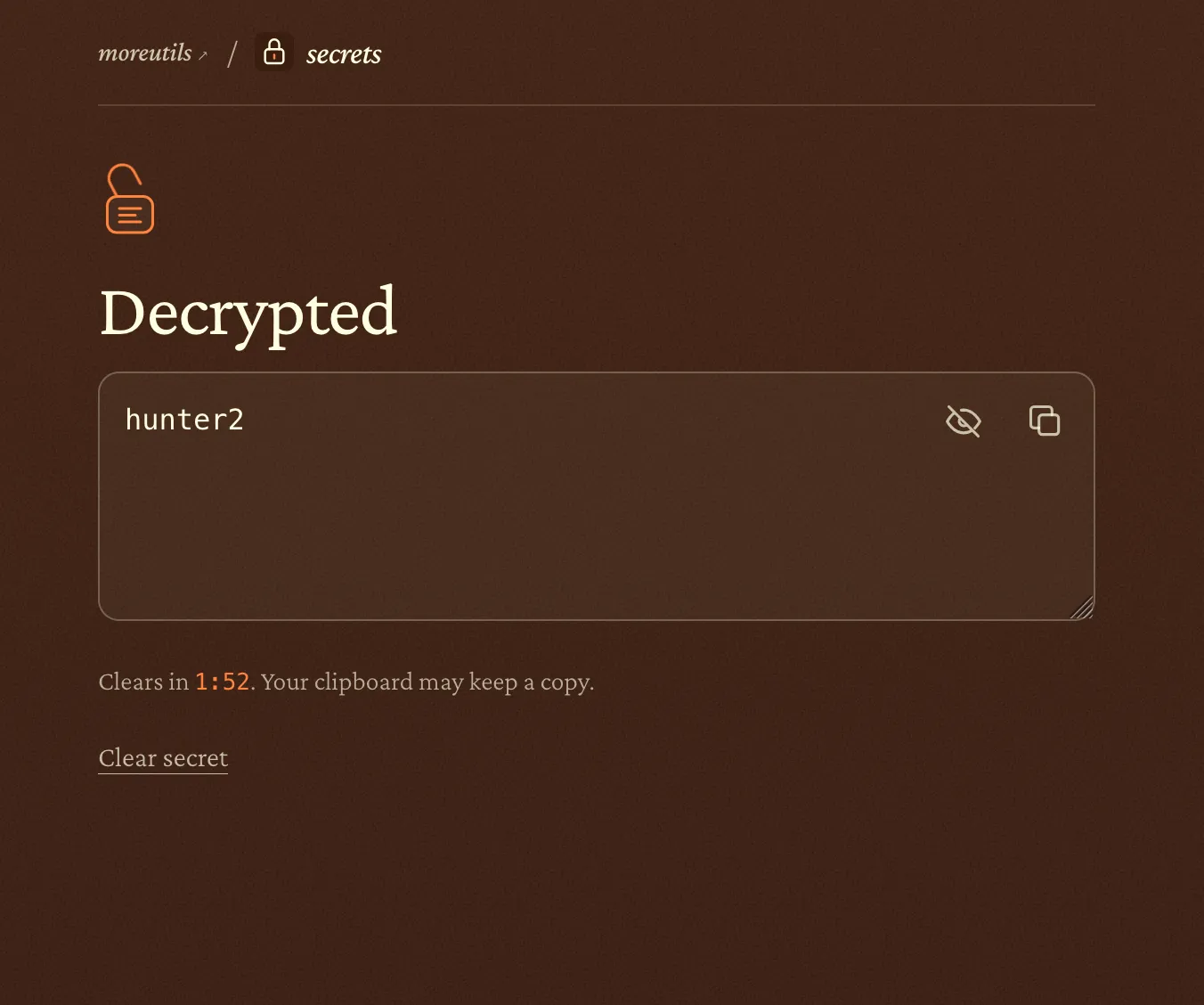
The animation shows what moves and what stays private. The public link travels out. The secret encrypts on the sender’s device, travels back as ciphertext, and becomes readable on the recipient’s device. The private key stays put.
Pasting a secret encrypts it immediately; pasting a valid reply opens it. A damaged reply leaves the receiving key available to try again. I wanted people to understand enough to finish the exchange without first learning the vocabulary.
Here is the actual flow, using hunter2 as a sample password.
The link had to look usable
I chose HPKE with X25519 partly because I wanted a small receiving link. A huge URL full of parameters is a poor invitation to someone who’s already unsure what you’re asking them to do. I wanted something easy to copy and paste, with less opportunity for a chat client or a person to mangle it.
The request packs a version byte, expiry, and 32-byte public key into 37 bytes.
Base58 makes that a 50-character token: an 81-character receiving URL on the
current site. It goes after the URL’s #, so the browser doesn’t send it in
the HTTP request. The encrypted reply grows with the secret.
Underneath, this is HPKE, RFC 9180 in base mode, implemented with hpke-js and Web Crypto. The cryptography is standard. The work was in the UX.
Keys for this exchange
By default, the receiving private key lives in a browser worker as a non-exportable Web Crypto key. It isn’t uploaded or saved in browser storage. The application discards it after opening the first valid reply.
The recipient has to keep the page open. Switching tabs is fine; reloading, closing it, or leaving loses the key. Make another link if that happens. There’s an explicit security-key option for saving an exchange across browser restarts, with compatibility and recovery limits explained on the security page.
Good enough for what
The server serves the application, with no secret-upload endpoint or ciphertext relay. Chat carries a public link and an encrypted reply instead of plaintext. Someone who sees the link can encrypt a reply, but cannot use it alone to decrypt one.
Before sending, compare the verification words on a call or in person. Comparing them in the same compromised chat lets an attacker replace both. Confirm who sent a reply before opening it: encryption doesn’t establish the sender’s identity.
A compromised browser, extension, device, or modified copy of the site can capture the secret. Recipients can keep copies. The application’s seven-day expiry and one-use behavior don’t revoke anything retained elsewhere. Clearing the page doesn’t clear the secret from your clipboard history.
“PGP for normies” describes the goal. The tool uses HPKE rather than OpenPGP. Keeping a password out of a chat log shouldn’t require teaching someone how to manage keys.